Cutler / How it's different
How it's different
Most AI editing tools give you an answer. Cutler shows its work.
There are good AI tools for video now, and they solve different problems. This page compares the approaches, what each does well, and where Cutler is different. No names and no scoreboard: pick the one that fits your job.
Updated 21 November 2026 · by Erik Lindgren, editor and maker of Cutler
The approaches, side by side
Silence and jump cutters
Decides by loudness
Remove pauses and filler from a talking head, fast. They work from the audio level, so they can't tell a good take from a bad one.
Great when one talking head needs tightening.
Text-based editing
Decides by the transcript
Edit the words and the video follows. Excellent for interviews, and blind to what's on screen, so b-roll and footage without dialogue sit outside it.
Great when the words are the edit.
Browser editors with an AI built in
Decides in their app
Upload your footage, chat with the editor, export. Convenient, but the media leaves your machine, the timeline lives in their software, and you finish there.
Great when you don't edit in Final Cut and want one place for everything.
Sync and multicam tools
One job, done well
Line up cameras and separate audio by sound. Useful, and now widely available.
Great when sync is the whole problem.
Cutler
Proposes, explains, asks
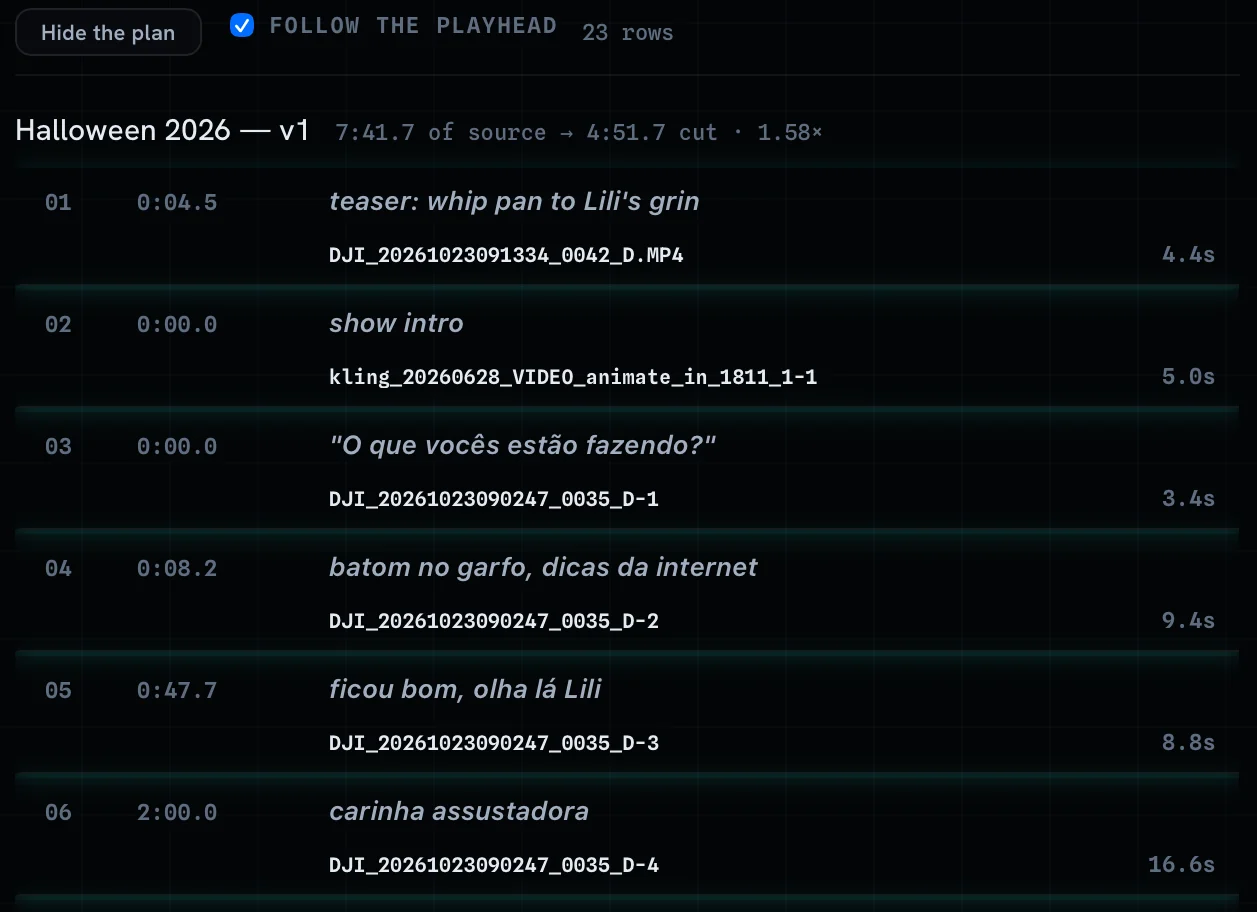
An assistant editor for Final Cut Pro. Your own Claude or ChatGPT reads the whole shoot, what's said and what's on screen, and proposes a first cut where every row says which take, why it's there, what was checked and what's left to you. It arrives as a Final Cut project on your original media.
Great when a real shoot needs a first cut, and you want to judge the reasoning instead of taking it on trust.
What "shows its work" means
01
A reason on every row
Every clip in the paper edit says why it's there, so you can read the cut before you watch it.
02
The checks it ran
Soft focus, blinks, motion blur, dark or shaky takes and awkward framing are flagged, so you know what was looked at.
03
The calls it left to you
Judgement calls come back to you with options, instead of a silent guess.
04
One change at a time
Disagree with a row in plain language and ask for a change. Only that changes.
Why that matters to an editor
A cut you can't question is a cut you have to re-check from scratch. A cut that shows its reasons is one you can review like an assistant's: agree with most of it, push back on some, and get on with the edit. And when a client asks why that take, you have an answer.
One of my own shoots, in numbers
Every one of the 32 rows carries its reason. That's what you review, not an hour and 38 minutes of footage.
When another tool is the better pick
- You only need pauses removed from one talking head. A silence cutter is simpler.
- You edit mainly in Premiere Pro or DaVinci Resolve. Cutler's export to both is in beta; Final Cut is where it's complete.
- You're on Windows or an Intel Mac. Cutler runs on Apple Silicon Macs only.
- Your footage can't reach any AI provider. The cut needs Claude or ChatGPT. See which AI does what.
- You want AI to make new footage. Cutler doesn't generate anything. It cuts what you shot.
The full list is on what Cutler can't do.
Yours, all the way through
- Your AI. It runs on the Claude or ChatGPT plan you already have. Cutler adds nothing to what your provider charges.
- Your project. A Final Cut Pro project with roles, keywords and native multicam, on your original media.
- Your licence. Pay once. Stop using Cutler tomorrow and you lose nothing.
Questions
Is Cutler an automatic editor?
No. It's an assistant editor. Your own Claude or ChatGPT proposes a first cut with a reason on every clip, and you decide, change and finish it in Final Cut Pro.
Does Cutler replace silence-removal or sync tools?
It syncs cameras and separate audio by sound and cuts by sentence, so for many jobs you won't need a separate tool. If all you do is tighten one talking head, a silence cutter is simpler.
Which editing apps does it work with?
Final Cut Pro is complete today. Premiere Pro and DaVinci Resolve XML export is in beta: synced takes arrive as stacked layers, and each export lists what it couldn't carry.
Keep reading
Cutler · macOS · Apple Silicon
AI video editing that shows its work.
One-time purchase, €25 for the first 100 founder licences. Your AI plan stays yours.