Cutler / AI and privacy
AI and privacy
Which AI does the work, and what it sees.
Cutler includes no AI of its own. The work splits into three jobs, listening, looking and deciding, and for each one you can see who does it and what they receive. This is the full map, checked against the app as it ships.
Checked against Build 608 · 21 November 2026 · by Erik Lindgren, editor and maker of Cutler
Three jobs, three answers
01 · Listening
Transcription
On your Mac. Always.
Whisper transcribes on your machine, offline. There is no cloud option, so your audio never leaves the Mac.
02 · Looking
Shot descriptions
Your choice, including your own Mac.
Cutler turns each clip into still frames, and someone describes them: the AI you're chatting with, or a model you pick in AI Setup.
03 · Deciding
The cut
Claude or ChatGPT, on your account.
The editing decisions run in Claude or ChatGPT, under your own account and its terms. That part isn't local, and Cutler doesn't pretend otherwise.
What the AI making the cut receives
Whichever setup you choose, this is the line.
It receives
- Your brief and your instructions
- The transcript
- Cutler's notes on each shot
- Still frames, when it asks to look at a clip
It never receives
- Your video files
- Your audio files
- Your API keys or sign-ins, which stay on your Mac
- Anything through us: Cutler talks to your AI from your Mac, and we never see your footage, transcripts or prompts
Who looks at your footage: four choices
All the AI Setup options read the same still frames with the same instructions. Only the model, and where it runs, changes.
The AI in your chat
Claude or ChatGPT looks at contact sheets of your clips, on the plan you already pay for. The stills go to Anthropic or OpenAI under your account's terms. A chat holds about 70 contact sheets, so a big shoot is described over several chats.
Best for: getting started, and your own footage.
Claude, with your API key
Cutler sends the stills to Anthropic and describes the whole shoot in one go, priced before it runs. One vendor, one set of terms you can hand a client.
Best for: big shoots, and client work cleared for Anthropic.
Qwen, rented
An open-weights model, Qwen3-VL, at a fraction of the Claude API price. Your stills cross two companies: OpenRouter, then the provider it routes them to.
Best for: big personal shoots on a budget. Cheaper, not more private.
Qwen, on your Mac
A Qwen vision model running on your own machine, on Macs with 32 GB of memory or more. Nothing leaves for the descriptions, ever, and there's no cost per clip.
Best for: footage you can't send anywhere to be described.
Even with Qwen on your Mac
The cut itself is still made by Claude or ChatGPT. It works from the transcript and Qwen's descriptions, and it can ask to see a clip's still frames. When it does, those frames go to your AI.
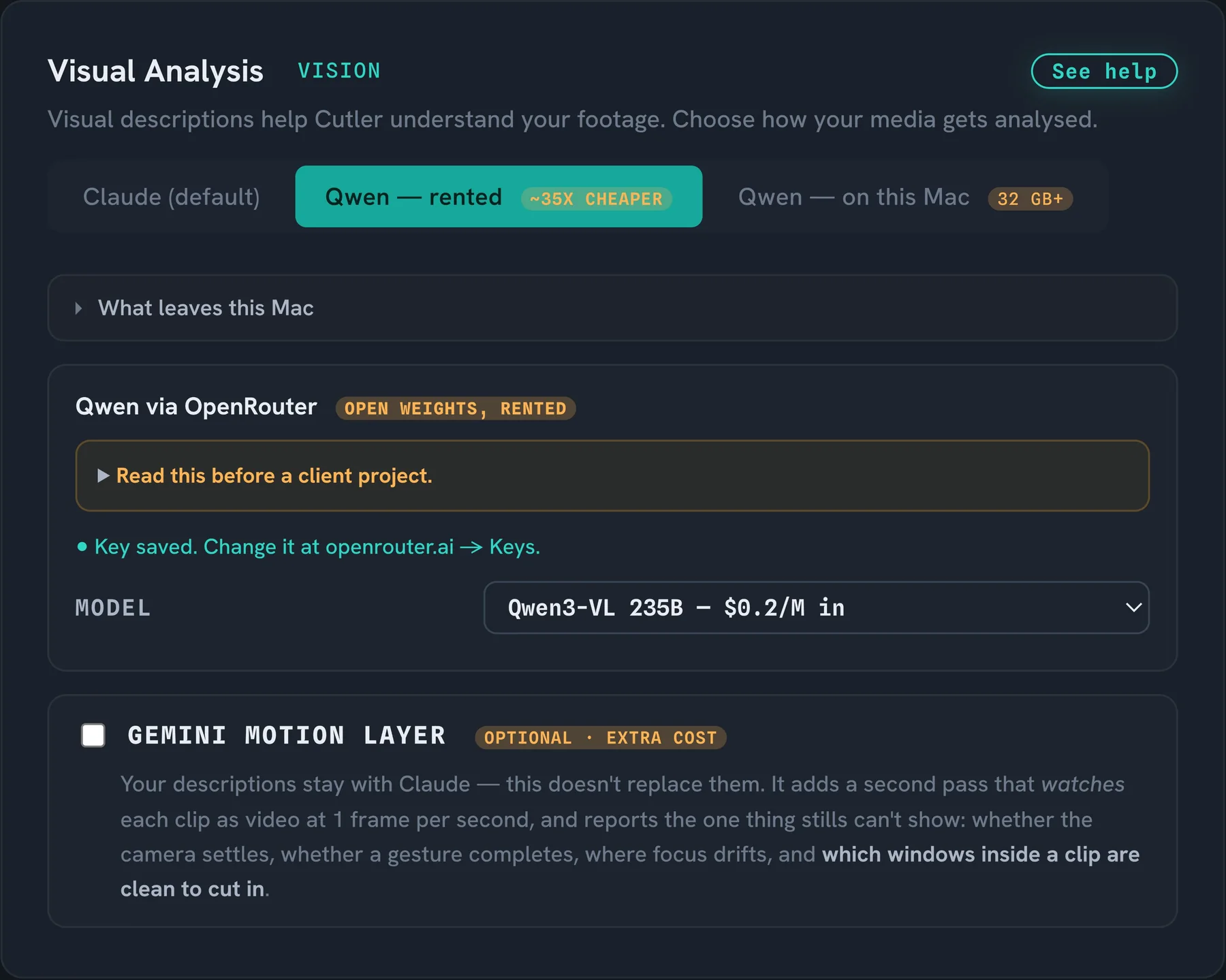
Rented Qwen: read this before a client project
OpenRouter is a router, not a model host. Frames sent through it cross two companies, and both companies' rules apply together.
- Cutler asks for zero-retention providers on every request: no provider that stores or trains on what you send, and no silent reroute. If no such provider is free, you get an error, not a fallback.
- The analysis log names the provider that served each clip.
- Never switch on prompt logging in your OpenRouter account. It trades a small discount for a commercial right to what you send.
- A self-serve OpenRouter account has no data processing agreement. If your contract needs one, or needs EU data residency, use Claude or the model on your Mac.
The one setting that sends moving pictures
Still frames can't show a camera settling, a gesture finishing or focus drifting. The optional motion layer adds a second pass with Google's Gemini that watches each clip as video, about one frame a second, with or without sound. It's off unless you switch it on, it needs your own Gemini key, and Google bills it.
When it's on, Cutler makes a small 360p copy of each clip on your Mac and sends that copy, never your camera originals. Each upload is deleted as soon as the answer comes back. Google's free tier may use what you send to improve its products and only the paid tier doesn't, so Cutler asks you to confirm before it runs.
The plain version: with the motion layer off, no video leaves your Mac. With it on, a 360p copy of each clip goes to Google.
Which setup for which job
| Your situation | Who looks | Who decides |
|---|---|---|
| Your own footage, a first try | The AI in your chat | Claude or ChatGPT, on your plan |
| A big shoot, hundreds of clips | Claude with your API key, or rented Qwen to keep the cost down | Claude or ChatGPT |
| Client footage, contract allows a named AI provider | Qwen on your Mac, or Claude with your API key | Claude or ChatGPT, under your account |
| Contract needs EU data residency | Qwen on your Mac, or Claude. Not rented Qwen. | Check your provider's terms |
| Nothing may reach any AI provider | Cutler isn't the right tool for that job today. Transcription runs on your Mac, but the cut needs Claude or ChatGPT. | |
Your keys and your licence
An API key or sign-in you give Cutler stays on your Mac and is only used to talk to the provider it belongs to. We never receive it. Your licence is checked on your Mac too. The privacy policy has the details, provider by provider.
What's next
More of this running on your Mac is what I'm working on. When something ships, it goes in the changelog with a date. Until it's there, this page describes what Cutler does today, and nothing more.
Questions
Does Cutler upload my footage?
Your video files are never uploaded. By default the AI receives the transcript, Cutler's notes on each shot and still frames. The one exception is a setting you switch on yourself: the optional motion layer sends a small 360p copy of each clip to Google.
Can Cutler run fully offline?
Not today. Transcription runs offline on your Mac, and shot descriptions can too with Qwen on a Mac with 32 GB of memory or more. The cut itself is made by Claude or ChatGPT, so it needs an internet connection.
Will my footage be used to train AI models?
Not by us. Cutler has no AI of its own and never receives your footage. What a provider may do with what you send is set by your account's terms and data settings with that provider, so check them before client work.
Is rented Qwen more private than Claude?
No. It's cheaper. Your stills cross two companies instead of one. If privacy is the reason, choose Qwen on your Mac.
Which setup costs least?
Qwen on your Mac costs nothing per clip. The AI in your chat adds nothing to the plan you already pay for. Rented Qwen costs a fraction of the Claude API price, and Cutler shows the price before anything paid runs.
Keep reading
Cutler · macOS · Apple Silicon
AI video editing that shows its work.
One-time purchase, €25 for the first 100 founder licences. Your AI plan stays yours.