Cutler / Edit video with ChatGPT
Edit video with ChatGPT.
ChatGPT can make editing decisions, but on its own it can't see your footage, sync your cameras or build a timeline you would open. Cutler is that missing part. It runs on your Mac, works in Codex or in its own window signed in with your ChatGPT account, and delivers a Final Cut Pro project on your original media.
Updated 11 November 2026 · by Erik Lindgren, editor and maker of Cutler
Can ChatGPT edit video?
On its own, ChatGPT can't watch your footage or write a timeline Final Cut Pro will open. It can only work from what you hand it, such as a transcript or an exported XML. Cutler gives it the rest: your clips synced by sound, a transcript made on your Mac, a description of every shot, and editing tools that write a validated Final Cut Pro project. ChatGPT makes the editing decisions on your own plan; you finish in Final Cut.
Two ways in, same tools
Codex
Inside the ChatGPT app
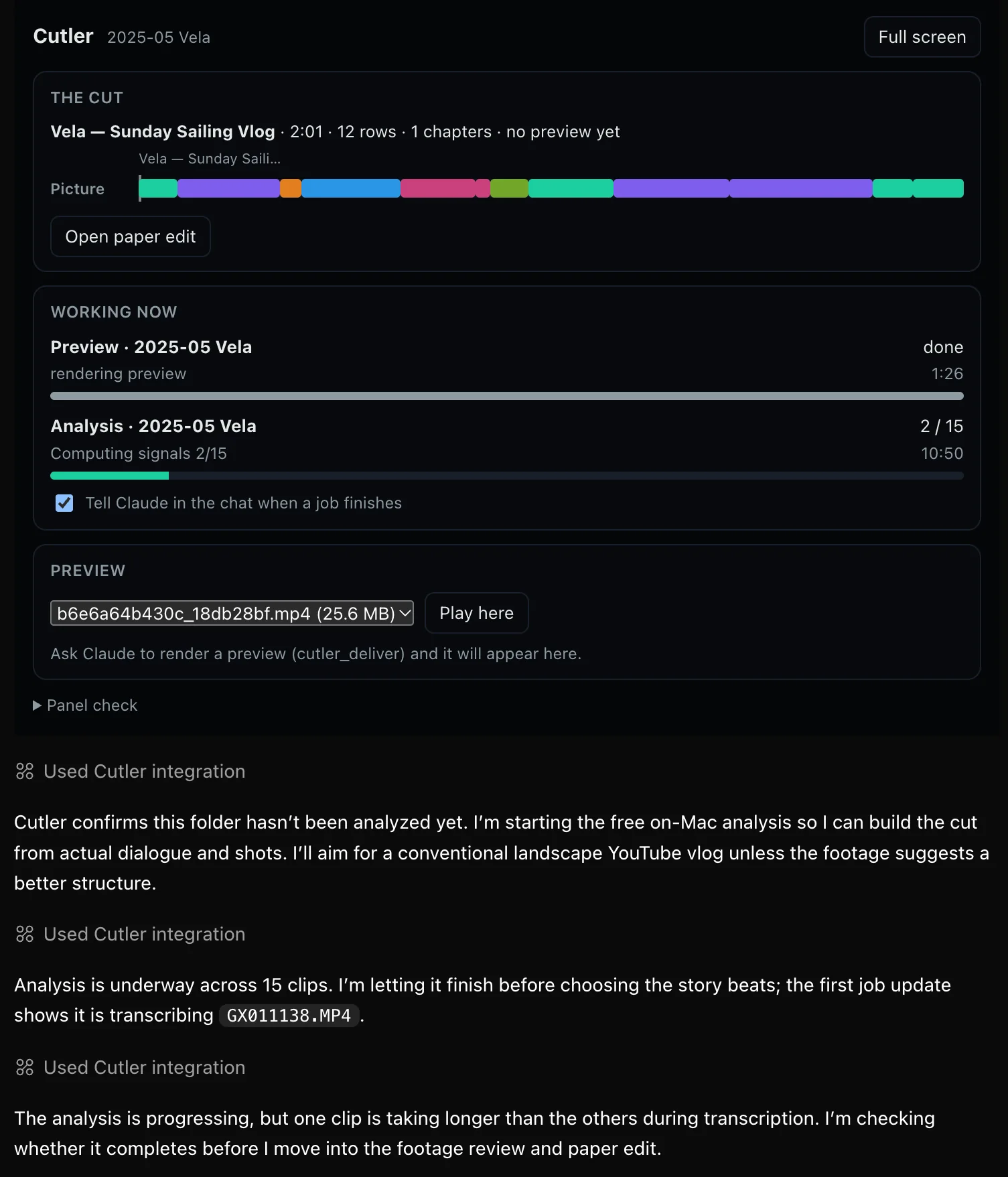
Use Codex in the ChatGPT app and Cutler's live panel shows the work as it happens.
Cutler's window
Signed in with ChatGPT
Or edit in Cutler's own window, signed in with your ChatGPT account.
Either way it uses your ChatGPT plan. No API key, no credits.
What Cutler gives ChatGPT
Eyes
It knows what is in every clip
Transcription on your Mac, a description of every shot, and flags for soft focus, blinks, motion blur and dark takes.
Sync
Cameras and mics, aligned
Sources lined up by waveform, no timecode needed. When it isn't sure, it asks you.
Hands
Real editing tools
Frame-accurate cuts with a timecode and a reason on every row, music, graphics and layouts.
A timeline
It checks its own work
A paper edit, a ribbon of every shot and a preview it can watch before handing anything over.
How a session goes
- Open Cutler and choose ChatGPT as the way you edit.
- Point it at a folder from a real job. Raw camera cards, separate audio, unsynced multicam: all fine.
- Tell it what the video is for. The conversation is the brief. It asks what it needs while Cutler analyses the footage.
- Read the proposal. Every clip comes with its source, its timecodes and the reason it is there. Say "the payoff drags" and it changes only that.
- Open the result in Final Cut Pro, or ask for a rendered preview with music and graphics.
A real job
Rebuild a Premiere edit through ChatGPT
Markku used this route to rebuild an unfinished Premiere edit in Final Cut: he gave ChatGPT his original clips and an export of the edit, and kept editing on his own media. How the rebuild works →
“The result was remarkably close to the original Premiere edit!”
Briefs that work
The conversation is the brief. Say what the video is for, who will watch it, how long it should run and what has to be in it. Three examples to adapt; replace the parts in brackets:
Then read the proposal and push back in plain words, such as "the intro drags" or "use the wide shot here". It changes only what you name.
From people editing with ChatGPT
What they say
“Our first impressions are very positive! Cutler successfully analyzed the footage, performed cuts, made editing decisions, added background music, and generated previews.”
“ChatGPT has become a particularly useful companion for my Cutler experiments. …it already has a good understanding of how I work and what I'm trying to achieve. That makes it much easier to formulate detailed instructions for Cutler, especially when experimenting with workflows I haven't tried before.”
That second point is ChatGPT's own memory of your earlier chats, when you have it switched on in ChatGPT. It isn't a Cutler feature, but it does make your briefs better over time.
What you need
- A Mac with Apple Silicon running macOS 14 or later.
- Your own ChatGPT account and plan.
- Final Cut Pro to open the timeline. Premiere Pro and DaVinci Resolve XML export is in beta.
Questions
Can ChatGPT edit video?
With the right tools, yes. On its own ChatGPT can't see your footage, sync your cameras or build a timeline an editor would open. Cutler gives it transcripts, shot descriptions, sync and real editing tools, and delivers a Final Cut Pro project.
Do I need an OpenAI API key?
No. You sign in with your own ChatGPT account and Cutler runs on your ChatGPT plan. Cutler includes no AI and adds nothing to what OpenAI charges.
Do I need ChatGPT Plus?
No. Codex is included on every ChatGPT plan, including Free; a bigger plan mainly means you can run more before hitting limits, and you sign in with the account you already have. OpenAI Help, checked 11 November 2026.
Claude or ChatGPT: which should I use?
The one you already pay for. Cutler gives both the same editing tools, so the workflow and the Final Cut Pro project you get are the same.
Does my footage go to OpenAI?
Your video files stay on your Mac and transcription runs locally. When the AI looks at shots it sees still frames through your account, or you can have a local model on your Mac do that on machines with 32 GB of memory or more.
Can it rebuild an edit I started in another app?
Yes, when you give it the original clips and an export of that edit as a reference. Markku rebuilt an unfinished Premiere Pro edit this way and kept editing in Final Cut Pro. Anything baked into the export, like an opening effect, can be taken from the reference itself.
Does it generate video?
No. It cuts the footage you shot. Every clip in the timeline points at your original media.
Keep reading
Cutler · macOS · Apple Silicon
AI video editing that shows its work.
One-time purchase, €25 for the first 100 founder licences. Your AI plan stays yours.