Cutler / PluralEyes alternative
A PluralEyes alternative that syncs by sound, then cuts.
PluralEyes taught a generation of editors to stop clapping. Since 2023 it has been in maintenance mode. Cutler lines up your cameras and separate audio by waveform, without timecode, and then hands the synced footage to Claude or ChatGPT to log and cut. You open the result in Final Cut Pro as native multicam.
Updated 11 November 2026 · by Erik Lindgren, editor and maker of Cutler
What happened to PluralEyes
Maxon, which owns Red Giant, put PluralEyes into limited maintenance mode on 1 February 2023. It still runs with the host-app versions it last supported, but it isn't updated for newer ones, and an operating-system upgrade can stop it working. If your sync step depends on it, that is a risk on every new Mac and every Final Cut update.
Where Cutler is different
Built-in sync works clip by clip, inside the editor. Cutler works on the whole job before you open the editor, and sync is only the first step.
- The whole folder at once. Raw cards from several cameras, a separate recorder, a phone. Drop the folder and Cutler works through all of it.
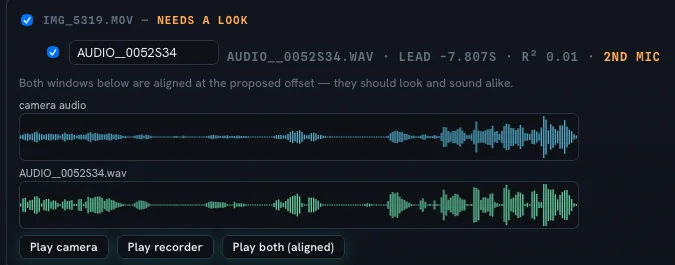
- No timecode needed. Sources are aligned by waveform.
- You rank the sources. Tell it which recorder is the clean sound and which cameras matter most.
- It asks when in doubt. If an alignment isn't certain, Cutler shows it to you instead of guessing.
- Multi-channel recorders handled. Separate channel files from one take are grouped together.
Then the first cut, not just a synced bin
After sync, Cutler transcribes everything on your Mac and describes every shot. Claude or ChatGPT uses that to find the strongest moments, flag soft or shaky takes and propose a first cut, with the source, timecodes and reason for every clip.
- Drop the folder from a real job: interviews, a podcast, a talk, an event.
- Say what the video is for. The conversation is the brief.
- Read the proposal and argue with it in plain language.
- Open it in Final Cut Pro as native multicam, on your original media, and keep cutting your way.
PluralEyes alternatives on Mac, honestly compared
If all you need is to line clips up, your editor may already do it. Here is how the built-in options and the dedicated tools compare with Cutler, which syncs and then cuts.
| Tool | What it syncs | Whole folder or clip by clip | Cuts afterwards | Price model |
|---|---|---|---|---|
| Final Cut Pro (built-in) | Video and separate audio, and multicam angles, by audio waveform (also markers or timecode) | Clips you select in the browser; no watch folder | Yes — it is a full editor | $299.99 one-time, or an Apple Creator Studio subscription |
| DaVinci Resolve (built-in) | Multicam angles, by audio waveform, timecode or in/out points | Not stated on Blackmagic’s page | Yes — it is a full editor | Free; Studio $295 one-time |
| Syncaila | Multicam video and separate audio, by audio matching | Whole project or batch, with a watch folder | No — a sync tool; you re-import to your editor | One-time licence, no subscription |
| Cutler | Multicam and separate audio, by sound | The whole folder at once | Yes — builds a first cut you finish in Final Cut Pro | €25 one-time (first 100 founder licences) |
Non-Cutler cells checked 11 November 2026 on each vendor’s own site: Final Cut Pro, DaVinci Resolve, Syncaila. Final Cut’s price is Apple’s current listing and Syncaila publishes no price on its site — confirm both before relying on them.
What you need
- A Mac with Apple Silicon running macOS 14 or later.
- Claude (Claude Code or the Claude app) or ChatGPT, on the plan you already have. No API key needed.
- Final Cut Pro to open the timeline. Premiere Pro and DaVinci Resolve XML export is in beta.
Transcription always runs on your Mac and your video files stay where they are.
Questions
Is PluralEyes discontinued?
Maxon put PluralEyes into limited maintenance mode on 1 February 2023. Existing users can keep using it, but it isn't updated for newer versions of editing apps, and Maxon doesn't guarantee it keeps working after an operating-system upgrade.
Doesn't Final Cut Pro already sync by audio?
Yes. Final Cut Pro, Premiere Pro and DaVinci Resolve all sync clips by waveform, and for a couple of clips that is often enough. Cutler is for whole jobs: a folder of cards from several cameras and a recorder, synced, logged and cut in one pass.
Does Cutler need timecode?
No. Sources are aligned by their audio. When an alignment isn't certain, Cutler shows it to you to confirm instead of guessing.
Does it re-encode my footage?
No. Every clip in the Final Cut Pro project points at your original media. Nothing is copied, transcoded or generated.
Which editing apps does it export to?
Final Cut Pro, as a validated FCPXML project with native multicam. Premiere Pro and DaVinci Resolve XML export is in beta.
Keep reading
Cutler · macOS · Apple Silicon
AI video editing that shows its work.
One-time purchase, €25 for the first 100 founder licences. Your AI plan stays yours.